
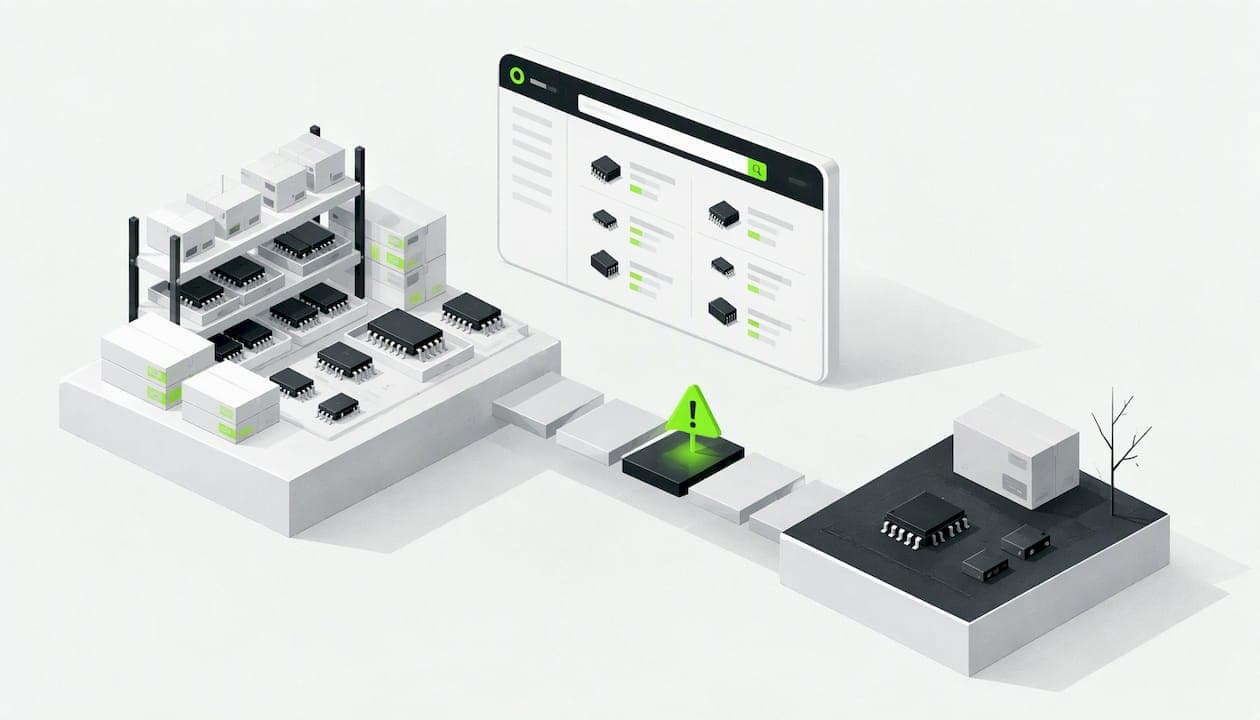
Component lifecycle risk is the chance that a part on your bill of materials stops being available, or stops being the part you qualified, before your product reaches the end of its own life. It shows up as a discontinuation notice, a lead time that jumps from weeks to a year, or a distributor shelf that quietly empties. You manage it by knowing each part's lifecycle status, scoring the parts that would hurt most, qualifying alternates early, and deciding on a last-time-buy before everyone else does.
This guide is for design engineers, hardware startups and buyers who work in the 1 to 1,000 piece range. That is where a single dead part can stall a whole prototype run, and where there is usually no obsolescence team to catch it.
TL;DR
- Lifecycle risk is a mismatch problem: parts have short market lives, while finished products often need support for years. Standards such as IEC 62402 treat it as a process that runs across the whole life of the product.
- The riskiest status is usually NRND (not recommended for new designs), not obsolete. NRND parts are still easy to buy, so they get designed in.
- Score every BOM line on lifecycle status, number of qualified alternates, stock depth and how hard a redesign would be. Then spend your attention on the top 10 percent.
- Alternates only help if they come from a different manufacturer and meet form, fit and function. A second distributor for the same part is not a second source.
- Check lifecycle and stock at design time, not at purchase time. Doing it in the schematic stage is the cheapest fix you will ever get.
Table of Contents
- What lifecycle risk actually is
- The lifecycle stages and what each one means for you
- Why lifecycle risk is a business problem, not just a parts problem
- What the standard says
- A practical way to score your BOM
- Signals to watch beyond the official notice
- Multisourcing that actually reduces risk
- Last-time-buys without regret
- Perspective: check lifecycle where you design, not where you buy
- Putting it into your workflow
- Common mistakes
- Who needs to do what
- FAQ
- Sources
What lifecycle risk actually is
Every electronic component moves through a lifecycle. The names vary by manufacturer, but the arc is the same: a part is introduced, ramps up, sits in production for a stable period, then is marked as not recommended for new designs, then gets an end-of-life notice, and finally goes obsolete. The trouble is that the arc is set by the manufacturer's business, not by yours. A part that sells in small volumes, or one built on a process node the fab wants to retire, can be cut with little regard for the products that use it.
That creates the core mismatch. A literature review on obsolescence in commercial off-the-shelf systems notes that such systems often contain hardware and software whose lifespans are shorter than the intended life of the system. Industrial controllers, medical devices, test equipment and instrumentation are the classic examples. But a startup shipping a connected sensor for five years faces the same arithmetic.
It helps to separate three different problems that all get called "lifecycle risk":
- Lifecycle risk proper. The manufacturer announces it will stop making the part.
- Availability risk. The part is still active, but no distributor has stock, or lead times make your schedule impossible.
- Change risk. The part number stays the same, but the die, package or process changes, and your design no longer behaves as qualified.
The first one is the one with a notice. The other two often arrive with none, which is why watching only official announcements is not enough.
The lifecycle stages and what each one means for you
Here is how we read each stage from the point of view of someone choosing parts for a new board.
| Stage | What it means | What you should do |
|---|---|---|
| Active / production | Manufacturer is building and promoting the part | Fine to design in. Still check alternates exist. |
| Mature | Stable, low-growth, often a long-running workhorse | Usually safe, and often the best choice for long-life products. |
| NRND | Not recommended for new designs. Still sold. | Avoid for new designs. For existing designs, start planning now. |
| End of life / discontinuance notice | Manufacturer has announced it will stop making the part | Decide on a last-time-buy and start qualifying a replacement. |
| Obsolete | No longer manufactured | Only broker, excess or legacy stock remains. |
One caution on the table: the exact names, the notice periods and the last-order dates are set by each manufacturer, so read the notice itself. Do not assume the same timeline applies to every vendor.
Why NRND is the dangerous one
Most teams fear the word obsolete. The more expensive mistake is the part that is marked NRND. Distributors still list it, it is still in stock, the price is fine and the datasheet looks normal. Nothing in a quick search warns you. So it gets designed in, the board goes to layout, the prototype works, and only later does someone notice that the part is on its way out.
Obsolete parts, by contrast, are obvious. The problem is visible, and there is a known, if expensive, path of broker stock and legacy documentation. NRND hides the problem inside normal availability. When we talk to design teams about this, the lesson is always the same: a green stock indicator tells you about today, not about the next three years.
Why lifecycle risk is a business problem, not just a parts problem
If you have ever been stuck in firefighting mode, with one dead part after another landing on the same engineer, you are not alone. Researchers writing on obsolescence criticality argue that organizations stay reactive when they fail to translate technical obsolescence data into business terms such as system availability and total cost of ownership. A list of parts with an "EOL" flag does not get budget. A statement that three parts put 40 percent of next year's shipments at risk does.
The same line of work ties obsolescence management to corporate risk assessment frameworks, including IEC 31010, the standard on risk assessment techniques, published in June 2019. You do not need to adopt that framework to benefit from the idea. Express each risk as a likelihood (will this part go away?) and a consequence (what does it cost us if it does?). Then you can rank, and ranking is what turns a long list into a short plan.
What the standard says
If your customers or auditors ask for a formal approach, the reference point is IEC 62402:2019. It provides requirements and guidance for obsolescence management for any organization that depends on another organization to obtain value from the items it supplies. In practice that describes nearly every hardware company that buys parts.
The useful idea in it is that obsolescence management is not a one-time purchasing task. It applies throughout the life cycle of an item, from design and implementation through operation and maintenance to decommissioning. For a small team, that translates into three habits:
- Make lifecycle status part of part selection, not a check done by procurement afterward.
- Keep a record of which parts carry risk and what the plan is for each.
- Revisit the record on a schedule, because lifecycle status changes without asking you.
The standard is a purchased document, and we are not suggesting you need to read it cover to cover for a 50-part board. But if you sell into regulated or long-life markets, it is the language your customers will use.
A practical way to score your BOM
You do not need a risk platform to start. A spreadsheet next to your BOM is enough. For each line, score four things from 1 (low risk) to 3 (high risk):
- Lifecycle status. Active and mature is 1. NRND is 3. Any notice is 3.
- Alternates. Three or more drop-in parts from other manufacturers is 1. One is 2. A single-source part, such as a specific microcontroller or a custom sensor module, is 3.
- Stock depth. Multiple sellers with healthy stock at your quantity is 1. One seller, or stock only in small quantities, is 3.
- Redesign cost. A resistor or capacitor swap is 1. A new footprint is 2. A new processor, new firmware and requalification is 3.
Multiply status by redesign cost for a quick severity number, then use alternates and stock to break ties. A part that scores high on both lifecycle and redesign cost goes to the top of the list.
A worked example
Take a small motion-sensing board with 60 unique parts. A 10 kΩ 0603 resistor scores 1 on everything. A common LDO regulator that is active, has pin-compatible alternates from two other makers, and is stocked by several sellers scores low. The inertial sensor module is different: one manufacturer, no pin-compatible alternate, a firmware driver written around it. Even if it is active today, it lands in the red because the redesign cost is a 3 and the alternates score is a 3.

This is the sort of part where we would look at the whole product page, see who stocks it at your quantity and decide whether to buy a buffer. For example, the 3DM-CV7-GNSS/INS from MicroStrain by HBK is the kind of integrated navigation module where swapping to a different part means a software and mechanical rework, not just a new line in the BOM. Seeing its distributors and pricing side by side is a first step in judging how exposed you would be.
The result of the exercise is a short list, usually five to ten lines, that deserves real attention. The rest can wait for the next review.
Signals to watch beyond the official notice
A discontinuation notice is a lagging indicator. By the time it lands, stock is already moving. Better to watch several signals together:
- Lifecycle status from the manufacturer's own product page.
- Distributor inventory trend. Not just today's stock, but whether it is falling week after week.
- Price movement. A sudden price rise on a stable part can mean supply is tightening.
- Lead times. Extending lead times on one part number across sellers is an early warning.
- Manufacturer behavior. Stopped sampling, no new application notes, a successor part launched.
Some commercial tools do monitor several of these signals together and publish a score per part; the point for you is that no single field tells the story. You can approximate the approach by hand, at the quantities you buy, by comparing price and stock at several quantity breaks across sellers.
Do not rely on your distributor to warn you
An easy mistake is assuming that the distributor you buy from will tell you when a part is going away. Sometimes they do, but they may not forward every notice, or may do so late. If a part matters, go to the manufacturer's own change-notification service, subscribe with a shared team mailbox rather than one person's inbox, and check how much notice that manufacturer gives. Industry bodies publish guidance on product discontinuance notices, but the actual lead time you get depends on the vendor, so read their policy rather than trusting a rule of thumb.
Multisourcing that actually reduces risk
A common misunderstanding is that buying the same part from three distributors protects you. It protects you against one seller running out, which is availability risk. It does nothing if the manufacturer discontinues the part, because all three distributors drew from the same source.
Sourcing specialists make exactly this point: multisourcing at the distributor level does not mitigate obsolescence, and real risk reduction comes from qualified alternates from different manufacturers that meet form, fit and function requirements. That means:
- Same footprint and pinout, or a footprint you have deliberately designed to support both.
- Electrical parameters that meet or exceed the original within your design margins.
- Qualification you have actually done, not an assumption from a cross-reference table.
Designing for alternates is cheapest on the board. A dual footprint for two regulators, or a layout that tolerates two package sizes for passives, costs a little space and saves a respin.
Last-time-buys without regret
When a notice arrives, you have a short list of choices: redesign, qualify a replacement, or buy enough to last. The last-time-buy is attractive because it feels like buying certainty, and that is exactly why it is easy to do badly.
A sound last-time-buy has three parts.
A written forecast. Use a simple template: expected demand over the support period, spares and field returns, yield loss in assembly, and a safety factor you can defend. An ad hoc number from a meeting is how teams end up with either a shortfall or a shelf of unwanted parts.
A check on the product's real life. If you plan to sell for three more years and support for five after that, the buy has to cover the longer figure, or you need a plan for what happens when it runs out.
Storage. Stock that sits for years has to be stored properly. Moisture-sensitive parts need controlled packaging and humidity handling, and ESD control matters for sensitive devices. Bad storage can turn a purchase into scrap. Check the part's datasheet and the manufacturer's handling guidance before you commit to a large buy.
Compare the carrying cost of the stock against the cost of redesign. For a $0.40 part used in a low-volume product, buying the lifetime quantity is usually cheap. For a $40 module in a product that will keep evolving, a redesign path may be the better choice.

Perspective: check lifecycle where you design, not where you buy
We built Circuit Center for the people who design and buy hardware, and the same pattern keeps showing up: the information needed to avoid a lifecycle surprise exists, but it sits in a different tool from the one where the decision is made. The engineer picks a part in the schematic. The buyer sees it three weeks later in a spreadsheet. Nobody looks at the price and stock picture until the order is placed.
Our view is that sourcing data belongs next to the design. When you can open a KiCad project, see the BOM priced from real distributor data, and compare price and stock across sellers at 1, 10, 100 and 1,000 pieces, a part that has one thin seller and a rising price stands out while the schematic is still cheap to change. We also label whether a price comes from a live distributor feed or an older listing, because stale data is its own kind of risk.
We should be clear about what that does and does not do. Stock and price across sellers are strong signals, and they help you spot thin supply. They are not a replacement for the manufacturer's own lifecycle notices, and you should still subscribe to those for the parts that matter. Think of price and availability data as the second pair of eyes, not the only one.
— Matthew
Putting it into your workflow
Here is a routine that works for small teams and does not need a dedicated role.
- At part selection. Check lifecycle status. Reject NRND parts for new designs unless you have a specific reason. Ask whether an alternate exists from another manufacturer.
- At schematic release. Export the BOM and look at every line for single-source parts and thin stock. Flag the top ten.
- Before the first order. Price the build at your real quantity, and compare sellers. A part available from one seller only is a flag, even if it is cheap.
- Quarterly. Re-run the check on the same BOM. Lifecycle status and stock change without any notice to you.
- When a notice arrives. Open a short record: part, impact, options, decision, date. Then decide between a last-time-buy, a qualified alternate and a redesign.
- When you need a part now. Sometimes the problem is simply a missing part and a build date. Look for local counters before you pay for expedited shipping.
Pricing the build while you check it
The BOM tool takes a spreadsheet or a KiCad, Altium or Eagle export, matches every line to real parts and prices the build at your quantity with a recommended supplier for each line. The file is read in your browser, and only the part numbers are looked up. Lines that match poorly or show a single thin seller are the ones to look at first. If you work in KiCad, the Circuit Designer opens your project in the browser and prices the BOM from the schematic, so the sourcing check happens where you are already working. When a part is missing and you need it quickly, Parts for Pickup maps nearby suppliers with a pickup counter.
If you want to start with a single part, the component directory lets you search by how engineers type, such as "10k 0603", and compare sellers directly.
Common mistakes
- Treating in-stock as safe. Stock describes today. Lifecycle status describes the future.
- Counting distributors as sources. Multiple sellers of one manufacturer's part are still one source.
- Letting one person own the notices. If the only subscriber leaves, the notices go with them.
- Skipping the business case. A risk list without cost and schedule impact does not get funded, as the research on reactive obsolescence management suggests.
- Buying a lifetime supply without storage. Parts that degrade on a shelf are not an asset.
- Not recording the decision. Six months later, nobody remembers why a part was kept.
Who needs to do what
The split of work matters in a small company. Design engineers own part selection, footprints that allow alternates and the technical qualification of replacements. Purchasing owns price and stock monitoring, supplier relationships and the last-time-buy order. Whoever owns the product owns the question of how long the product will be supported, because every other decision follows from that number. If that number is unknown, the forecast cannot be written, and the team will default to buying whatever feels safe.
For mechanical and thermal colleagues, there is a related point. A replacement part can have a different package, different power dissipation or different mounting. Checking the heat estimate for the alternate before committing saves a surprise later. Circuit Center's thermal map gives an early estimate for comparing options, but it is not a sign-off, so confirm with testing.
FAQ
What is the difference between component lifecycle risk and component lifecycle management?
Lifecycle risk is the exposure: the chance and cost of a part becoming unavailable. Lifecycle management is the set of practices you use to reduce it, such as monitoring status, qualifying alternates and planning last-time-buys. Standards like IEC 62402 frame it as an ongoing process across the whole life of the product rather than a one-off task.
Is an NRND part always a bad choice?
For a new design, it is usually a poor choice, because you are building on a part the manufacturer is steering people away from. For a short-lived or one-off product it can be acceptable if you buy the whole quantity up front. Either way, make it a deliberate decision, not a surprise.
How often should I check my BOM for lifecycle problems?
At part selection, at schematic release and before every order, plus a regular scheduled review. Quarterly is a reasonable starting point for a small team. Increase the frequency for single-source or long-life parts.
Can I rely on my distributor to tell me when a part is being discontinued?
Not on its own. Distributors may not forward every notice, or may send it late. For parts that matter, subscribe to the manufacturer's change notifications directly and treat distributor stock and price trends as an additional signal.
When is a last-time-buy the right answer?
When the part is cheap relative to a redesign, your demand over the support period is reasonably known, and you can store the parts correctly. When the part is expensive, your forecast is shaky or the product will change soon anyway, qualifying an alternate is often safer.
Sources
- IEC 62402:2019, Obsolescence management
- IEC TC 56 news, including IEC 31010 publication date
- Methodology for assessing the criticality of component obsolescence, Springer Nature Link
- Literature review on obsolescence management in COTS-centric cyber physical systems
- What Is Lifecycle Management?, Z2Data